
Kepler Explorer1.1 - App Store
You'll be able to see results in few seconds.
Publisher Description
Thanks for the feedback! Version 1.1 will be submitted to Apple soon with the following:
- Fixed bugs with update feature
- Fixed incorrect temperature for Kepler Candidtates
- Fixed freezing while updating systems
- Color of orbit now determined by planet temperature
- Two new binary systems
With even more features to come in version 1.2!
- Improved UI responsiveness
- Improved UI for iPhones that works better on a small screen
- Retina Display support
- Game Center support
- And many more features!
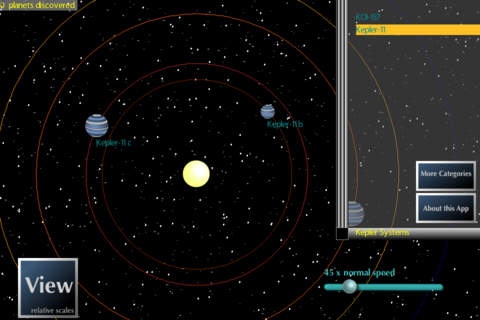
Kepler Explorer is an exciting new application for the iPad and iPhone, allowing anyone to gain a better understanding of the faraway planetary systems found by NASA's Kepler Mission.
Features:
- Explore an ever-expanding list of
thousands of far-away planetary systems
- Discover the potential compositions of
planets using the same formulas used by
astrophysicists, presented in a way
anyone can use!
- Compare and contrast these far-away
systems with our own solar system!
- View the relative scales of each planet
to its parent star.
- Speed up and slow down the rate of time
and pinch to zoom in and out while
interacting with the orbits of each
system!
OpenLab is a new research initiative at the University of California, Santa Cruz, that aims to strengthen collaboration between the arts and sciences. This application was a collaboration of the Department of Astronomy & Astrophysics, The Digital Arts and New Media Program, OpenLab Research, game developer John Peters, and astrophysicist Jonathan Fortney.
Requires iOS 3.0 or later. Compatible with iPhone, iPad, and iPod touch.
About Kepler Explorer
The company that develops Kepler Explorer is Jennifer Parker. The latest version released by its developer is 1.1.
To install Kepler Explorer on your iOS device, just click the green Continue To App button above to start the installation process. The app is listed on our website since 2012-03-27 and was downloaded 0 times. We have already checked if the download link is safe, however for your own protection we recommend that you scan the downloaded app with your antivirus. Your antivirus may detect the Kepler Explorer as malware if the download link is broken.
How to install Kepler Explorer on your iOS device:
- Click on the Continue To App button on our website. This will redirect you to the App Store.
- Once the Kepler Explorer is shown in the iTunes listing of your iOS device, you can start its download and installation. Tap on the GET button to the right of the app to start downloading it.
- If you are not logged-in the iOS appstore app, you'll be prompted for your your Apple ID and/or password.
- After Kepler Explorer is downloaded, you'll see an INSTALL button to the right. Tap on it to start the actual installation of the iOS app.
- Once installation is finished you can tap on the OPEN button to start it. Its icon will also be added to your device home screen.
Program Details
System requirements
Download information
Pricing
Version History
version 1.1
posted on 2012-03-27
Disclaimer
Official App Store Link
We do not host Kepler Explorer on our servers. We did not scan it for viruses, adware, spyware or other type of malware. This app is hosted by Apple and passed their terms and conditions to be listed there. We recommend caution when installing it.
The App Store link for Kepler Explorer is provided to you by apps112.com without any warranties, representations or guarantees of any kind, so access it at your own risk.
If you have questions regarding this particular app contact the publisher directly. For questions about the functionalities of apps112.com contact us.
